
Introduction to Docker 🐳

In this article lets try to understand one of the most popular tools used to containerize and deploy applications i.e. Docker. It makes packaging & deploying applications extremely easy.
We will try to look at the things that make Docker so special and learn how you can build, deploy, and fetch applications using Docker & Docker Hub using just a few steps.
Docker is an open source containerization platform.
It enables developers to package applications into containers—standardized executable components combining application source code with the operating system (OS) libraries and dependencies required to run that code in any environment. Docker has been a game-changer since its release in 2013.
Why use Docker?
You have probably heard the iconic phrase "It works on my machine". Well, why don't we give that machine to the customer?
- Improved—and seamless—portability
- Even lighter weight and more granular updates
- Automated container creation
- Container versioning
- Container reuse
- Shared container libraries
Docker architecture
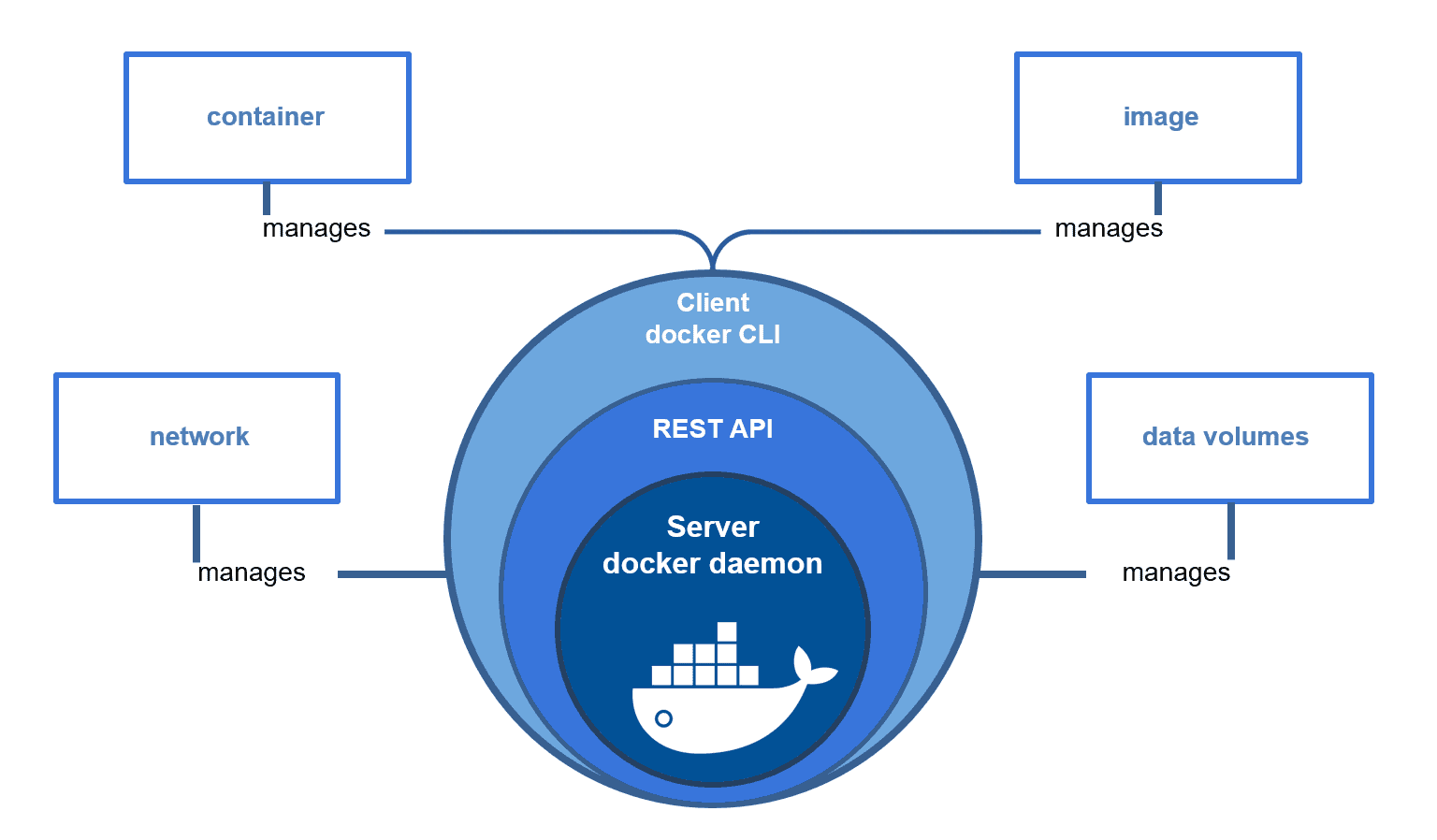
Docker uses a client-server architecture. The client talks to the Docker daemon, which does the heavy lifting of building, running, and distributing your Docker containers. The Docker client and daemon can run on the same system, or you can connect a Docker client to a remote Docker daemon. The Docker client and daemon communicate using a REST API, over UNIX sockets or a network interface. Another Docker client is Docker Compose, that lets you work with applications consisting of a set of containers.
Core components of Docker
- Docker file
- Docker Image
- Docker Container
- Docker Engine
- Docker registry
Dockerfile
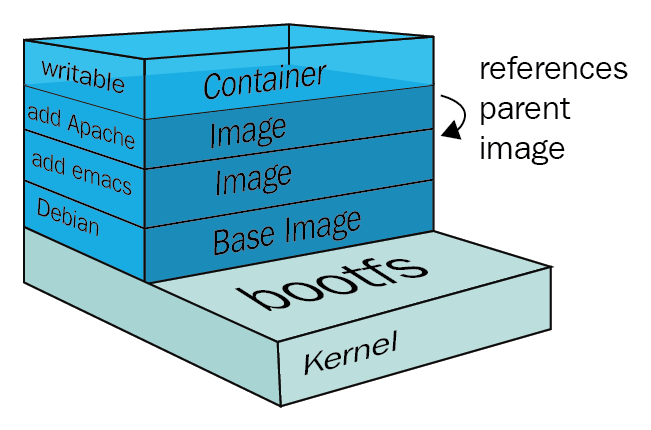
A Dockerfile is a script that consists of a set of instructions on how to build a Docker image. These instructions include specifying the operating system, languages, environment variables, file locations, network ports, and other components needed to run the image. All the commands in the file are grouped and executed automatically.
Docker Image
- It is a file, comprised of multiple layers, used to execute code in a Docker container.
- They are a set of instructions used to create docker containers.
Docker Container
It is a lightweight, standalone, executable package of software that includes everything needed to run an application: code, runtime, system tools, system libraries and settings.
Docker Engine
The Docker Engine (DE) is installed on the host machine and represents the core of the Docker system. It is a lightweight runtime system and the underlying client-server technology that creates and manages containers.
Docker Engine consists of three components:
- Server - the Docker daemon (dockerd), which is responsible for creating and managing containers.
- Rest API - establishes communication between programs and Docker and instructs dockerd what to do.
- Command Line Interface (CLI) - used for running Docker commands.
Docker Registry
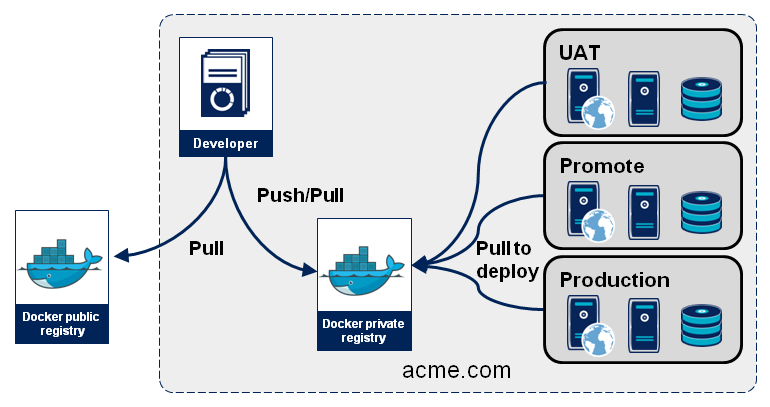
A Docker registry is a storage and distribution system for named Docker images. The same image might have multiple different versions, identified by their tags.
A Docker registry is organized into Docker repositories , where a repository holds all the versions of a specific image. The registry allows Docker users to pull images locally, as well as push new images to the registry.
DockerHub
DockerHub is a hosted registry solution by Docker Inc. Besides public and private repositories, it also provides automated builds, organization accounts, and integration with source control solutions like Github and Bitbucket.
To Wrap Up
Docker is a game-changer. But it is not a one-size-fits-all solution.
Whether you like it or not, this technology has a future. There are some developers and development agencies that hate Docker and try to eliminate it from all their ongoing projects. At the same time, there are specialists who containerize everything they can because they see Docker as a panacea. Perhaps, you should not join either camp. Stay impartial, stay objective, and make a decision depending on a particular situation.